Multiple database in CodeIgniter

How to connect to more than one database in codeigniter

Database config

$db[‘default’][‘hostname’] = “localhost”;
$db[‘default’][‘username’] = “root”;
$db[‘default’][‘password’] = “”;
$db[‘default’][‘database’] = “database_name”;
$db[‘default’][‘dbdriver’] = “mysql”;

set another config for 2nd database

$db[‘otherdb’][‘hostname’] = “localhost”;
$db[‘otherdb’][‘username’] = “root”;
$db[‘otherdb’][‘password’] = “”;
$db[‘otherdb’][‘database’] = “other_database_name”;
$db[‘otherdb’][‘dbdriver’] = “mysql”;

Sample to call

//Load another database
$DB2 = $this->load->database(‘another_db’, TRUE);

//Default database query
$this->db->select(‘first_name, last_name’);
$this->db->from(‘users’);
$this->db->where(‘id’, 99);
$query = $this->db->get();

//Another database query
$DB2->select(‘image’);
$DB2->from(‘cdn_images’);
$DB2->where(‘id’, 25);
$query = $DB2->get();


References

codexworld.com/connect-use-multiple-database-codeigniter


Focus and single-tasking

Focus is important. To focus is to do only one single task at a given time. But this is very hard to do.

Follow the following steps

1. Remove all distractions – silent and put away the smart phones, disable all notifications (email, messenger etc), stay away from people who love to disturb you etc

2. start small – start with 10 minutes focus time to do one small task and let youurself drawn into the task further without you know. split tough and huge tasks to smaller ones to achieve. Most important is to have PROGRESS

3. take a meaningful break. Focus is tiring. So take a solid and meaningful 10 minutes break everytime you complete a tough task. For example, drink water, stretching, have a meaningful and necessary discussions with colleague, check emails/messenger etc

Sales Ideas

Some sales ideas that can be implemented

Getting leads

  1. Online advertisement
    1. google ad
    2. facebook ad
    3. ad portal
    4. relevant whatsapp group
    5. relevant fb group
  2. Media advertisement
  3. Sponsor relevant events
  4. Write articles – newspaper or online
  5. Agents and resellers
    1. give good commissions to this sales partner
    2. support
    3. sales materials to help them do the sales
  6. Referrals (from existing customers, own networking that relate to prospects)
  7. Cold calls – from internet – website, fb etc
  8. SEO – optimize keywords on website, get more traffic to website
  9. Blog – add more useful and relevant contents and lead to the website
  10. Attend relevant events – seminar, expo
  11. Viral relevant content – ebook, infographic, quotes

Sales process/pitching/selling

  1. facts and figures
    1. number of customers
    2. since when
  2. build trust
    1. secure (for software – ssl)
    2. purchased by many others
    3. experience
  3. overview of products benefits and features
    1. infographic
    2. explainer video

Closing sales

  1. Create urgency
    1. limited time offer
    2. while stock last
    3. first xx customers
  2. money back guarantee (remove risk)
  3. free trial (try before buy)
  4. give max 3 options
    1. up sell
    2. cross sell
    3. under sell?

Business system

In order for business to expand, we have to set a system around it. It should cover all business activities. Starting from the most important ones.

Marketing

  • always-on marketing (capture leads)
    • google adwords
    • ad portal
    • whatsapp groups (what message to send, must be different everytime)
    • learn not to hard sell

Sales

  • copywriting on website
  • sales materials for whatsapp
    • write up and videos

Customer enrollment

  • online form for important information. Complete with description and guide on screen
  • first time migration or even “self migration”

Support

  • tracking system – open -> close
  • user guide
  • on screen guide (especiall when fill up form)
  • video guide – on important process/flow

Customer satisfaction

  • auto online survey form after a specific period of time
  • ask what they like most and what they hate most
  • what they wish to have

Development

  • prioritize
  • for features, try to split in phase if too big

Debugging

  • how to ensure not repeat
  • how to revert if has error

PHP array tips

Some tips.

1. Remove duplicates in array using array_unique

array array_unique ( array $array [, int $sort_flags = SORT_STRING ] )

2. Remove empty elements use array_filter

array array_filter ( array $array [, callable $callback [, int $flag = 0 ]] )

3. value is in the array use in_array

bool in_array ( mixed $needle , array $haystack [, bool $strict = FALSE ] )

4. key exist in array use array_key_exist

bool array_key_exists ( mixed $key , array $array )


Web application security

Below are some security checklist for a web application.

  1. Login screen
    1. to avoid brute force attack, display captcha after 3-5 attempts from same IP
    2. enforce longer password more than 8
  2. Registration (or open form)
    1. display captcha for all form to submit
  3. SSL is a must. free or paid
  4. displaying primary id for table in URL must be avoided, use other ID instead. E.g. a secure id consisting of unique 10 randomized alphanumeric

Ionic notes

Installation

1. Install Node JS to be able to use npm (js package manager)

https://nodejs.org/en/download/

After install Node JS, npm can be used.

To verify the installation successful can use the following command

node --version
npm --version

2. Then install ionic CLI using npm

Note: Use root or admin access to install

npm install -g @ionic/cli

# if to remove previous installation, use following command #
# -g means to install globally #

npm uninstall -g ionic
npm install -g @ionic/cli

Start project

Create new project using following command line. Several questions will be asked to setup the project – e.g. which js framework to use, initial framework etc.

ionic start

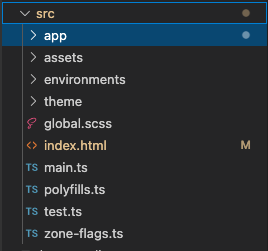
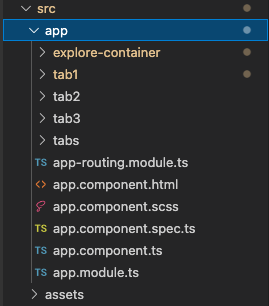
Ionic structure

index.html – main template to control title, icon
tabs – to control tabs
tab1, tab2 etc – page content

To preview the end result in browser, in terminal, go to project directory and run following command

ionic serve

Default port is 8100. To view the result, can go to http://localhost:8100

To add new page. Ionic generate command can be used to generate some other things as well like service, directive etc.

ionic generate

or in short:

ionic g

Compile ionic project to ios files. Before can start compiling, must do some setup on Xcode

  1. install Xcode in mac
  2. Once Xcode is installed, make sure the command-line tools are selected for use
    type this in terminal – xcode-select — install
  3. Setup a development team
    1. xcode > preferences > accounts. Add an apple ID. Once logged in, personal team will appear in the team list
  4. Create iOS simulator
    1. open xcode. Navigate to Window > Devices and Simulators. Can choose any simulator available
  5. Install ios-sim and ios-deply as below

The ios-sim and ios-deploy are utilities that deploy apps to the iOS simulator and iOS devices during development. They can be installed globally with npm.
npm install -g ios-sim
brew install ios-deploy

Build files for ios

  1. Generate native project. run at terminal:
    1. ionic capacitor add ios
    2. ionic capacitor open ios
    3. ionic capacitor copy ios

Resources

  1. official ionic docs
  2. ionic ui components
  3. ionicons
  4. building first app with ionic angular
  5. steps to build for ios
  6. steps to build for android
  7. deploying mobile on android and ios