If you are using postman to test, add the API Key as username in Authorization tab. Choose “Basic Auth” in Type dropdown. Then enter the URL and params as usual
Some free tools you can use to start your business. The providers normally provide the free tools for basic usage. Some limitation on features and users. But if you are small, it doesn’t matter much. At least you can start with some cool softwares to support your small business
To verify the installation successful can use the following command
node --version
npm --version
2. Then install ionic CLI using npm
Note: Use root or admin access to install
npm install -g @ionic/cli

# if to remove previous installation, use following command #
# -g means to install globally #

npm uninstall -g ionic
npm install -g @ionic/cli
Start project
Create new project using following command line. Several questions will be asked to setup the project – e.g. which js framework to use, initial framework etc.
ionic start
Ionic structure
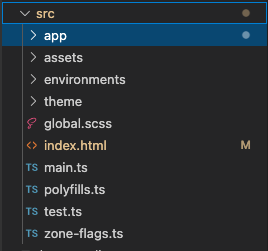
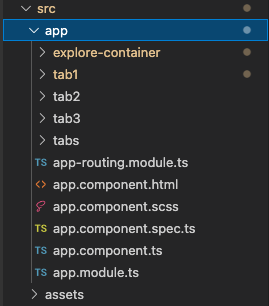
index.html – main template to control title, icontabs – to control tabs tab1, tab2 etc – page content
To preview the end result in browser, in terminal, go to project directory and run following command
ionic serve
Default port is 8100. To view the result, can go to http://localhost:8100
To add new page. Ionic generate command can be used to generate some other things as well like service, directive etc.
ionic generate

or in short:

ionic g
Compile ionic project to ios files. Before can start compiling, must do some setup on Xcode
install Xcode in mac
Once Xcode is installed, make sure the command-line tools are selected for use type this in terminal – xcode-select — install
Setup a development team
xcode > preferences > accounts. Add an apple ID. Once logged in, personal team will appear in the team list
Create iOS simulator
open xcode. Navigate to Window > Devices and Simulators. Can choose any simulator available
Install ios-sim and ios-deply as below
The ios-sim and ios-deploy are utilities that deploy apps to the iOS simulator and iOS devices during development. They can be installed globally with npm.
Getting yourself a used car has some advantages. The most severe one is you save thousands of your money. But need to be very careful in order to get a used car with good condition.
If you are looking for a used car, try out the following websites.
mudah.my – huge list of cars available
carlist.my – most of the list are more or less the same with mudah. especially from car dealer
motortrader.com.my – there is a rating from Goo KANTEI for the condition of the car. For some cars. Can find more cars directly from owners
oto.my – related to paultan.org and carbase.my
the rest not worth to mention here. Don’t have many listings
Some general tips to purchase second hand car
if possible check why previous owner sell
before go to see, ask questions over the phone. The most important one whether the car still available
ask to see the grant
ask for any other charges on top of car price – insurance, roadtax, change name, puspakom service, loan processing etc.
Some tips on checking the condition of the car
sign of accident (normally with uneven paint)
any leaking on engine and absorber etc
the hose and belts are in acceptable condition
test drive to check on engine is smooth and no irregular sounds from the car body or engine
tyre tread still ok, manufactured not more than 3 years