Focus is important. To focus is to do only one single task at a given time. But this is very hard to do.
Follow the following steps
1. Remove all distractions – silent and put away the smart phones, disable all notifications (email, messenger etc), stay away from people who love to disturb you etc
2. start small – start with 10 minutes focus time to do one small task and let youurself drawn into the task further without you know. split tough and huge tasks to smaller ones to achieve. Most important is to have PROGRESS
3. take a meaningful break. Focus is tiring. So take a solid and meaningful 10 minutes break everytime you complete a tough task. For example, drink water, stretching, have a meaningful and necessary discussions with colleague, check emails/messenger etc
To verify the installation successful can use the following command
node --version
npm --version
2. Then install ionic CLI using npm
Note: Use root or admin access to install
npm install -g @ionic/cli

# if to remove previous installation, use following command #
# -g means to install globally #

npm uninstall -g ionic
npm install -g @ionic/cli
Start project
Create new project using following command line. Several questions will be asked to setup the project – e.g. which js framework to use, initial framework etc.
ionic start
Ionic structure
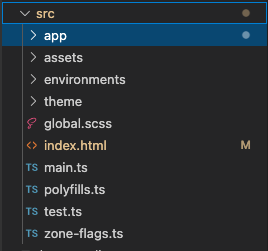
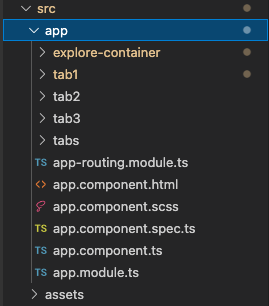
index.html – main template to control title, icontabs – to control tabs tab1, tab2 etc – page content
To preview the end result in browser, in terminal, go to project directory and run following command
ionic serve
Default port is 8100. To view the result, can go to http://localhost:8100
To add new page. Ionic generate command can be used to generate some other things as well like service, directive etc.
ionic generate

or in short:

ionic g
Compile ionic project to ios files. Before can start compiling, must do some setup on Xcode
install Xcode in mac
Once Xcode is installed, make sure the command-line tools are selected for use type this in terminal – xcode-select — install
Setup a development team
xcode > preferences > accounts. Add an apple ID. Once logged in, personal team will appear in the team list
Create iOS simulator
open xcode. Navigate to Window > Devices and Simulators. Can choose any simulator available
Install ios-sim and ios-deply as below
The ios-sim and ios-deploy are utilities that deploy apps to the iOS simulator and iOS devices during development. They can be installed globally with npm.